What's happened proxy in "Telegram» and why are they needed?
The Internet service provider has the ability to see the data flow that passes through Telegram, but this transmission is hidden due to the use of an intermediate server. This complicates the process of detecting a user inside the messenger.
It is important to note that in case of abuse and use of spam proxies in order to bypass the anti-fraud system in Telegram, the messenger should not have information about the very use of the IP address. To do this, you can set up an intermediate server using the third-party ProxyCap program. How can we do this already? wrote on the blog.
In this article we will look at how to configure proxy for Telegram и где можно их приобрести. К каждому шагу инструкции мы прикрепили скриншоты для лучшего понимания. Стоит отметить, что мессенджер «Телеграм» поддерживает только два протокола: Socks 5 и MTProto.
Benefits of use proxy in Telegram
Using proxy servers in Telegram can have several advantages:
- Bypass restrictions: In some countries and regions, access to Telegram may be restricted by the government. Using a proxy server allows you to bypass bans and maintain access to the messenger.
- Increased anonymity. Proxy servers can help hide the real IP address and location, making the user more anonymous online. This can be useful for those who want to protect personal information and ensure confidentiality in communications.
- Improved speed and stability. In some cases, using a proxy can improve the speed and stability of your connection to Telegram servers. This is especially useful if you have problems with a slow Internet connection or if Telegram servers are located far from your location.
- Working with restricted content: A proxy can help you access content that may also not be available in your region, such as some channels, bots, or third-party services.
However, it is worth remembering that using proxy servers can also have its own disadvantages and risks. For example, unreliable or untrusted proxies can pose a threat to the security of your data, so it is important to choose reliable and trusted proxy sources. In addition, Telegram may ban some proxy servers, which may cause access problems.
How proxies provide access to Telegram
Telegram bans occur in some countries due to various reasons such as internet regulation or censorship. However, using proxy for Telegram users can bypass bans and continue using Telegram.
Telegram предоставляет собственный прокси-протокол, MTProto, который позволяет пользователям обходить бан Telegram, используя прокси. Для этого в настройках Telegram можно включить опцию «Использовать прокси», где вы можете добавить или настроить прокси-сервер.
Privacy and security when using a proxy
To ensure privacy and security when using a proxy, follow several rules:
- Choose fast proxies for Telegram protocols such as SOCKS5 and HTTPS for better anonymity.
- Use trusted sources, avoid free public proxies.
- Prefer HTTPS and SOCKS5 for data security.
- Check how your proxy logs are processed.
- Correct configuration will help avoid data leaks. We will talk about this below.
Computer: Windows and Mac OS
Settings proxy in Telegram on PC on Windows and Mac OS the same. Therefore, we will provide one instruction for two operating systems.
Telegram looks the same on all versions of Windows: 7, 8, 8.1, 10. The same with Mac. The algorithm for adding a proxy is as follows:
- Open “Settings”.

2. In the menu that appears, select “Advanced settings”.
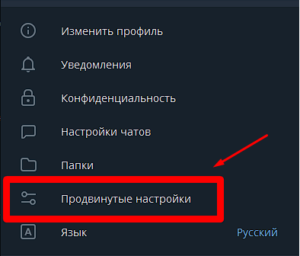
3. Click “Connection Type”.
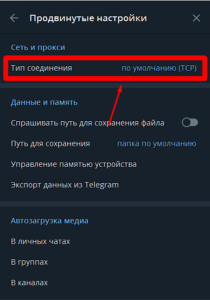
4. Click “Use your own proxy”.
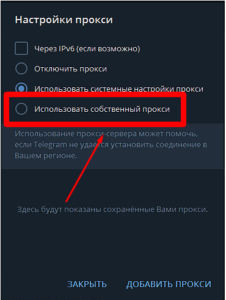
5. Select the IP address protocol.
6. Enter the IP data: server, port, login and password.
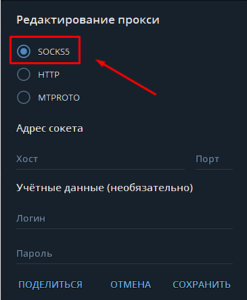
7. Click “Save”.
8. If the intermediate server is working, you will see proxy settings in Telegram "Connected" sign.
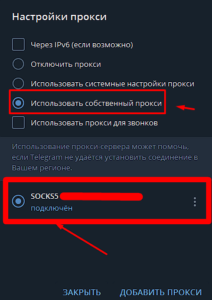
9. Click “Add proxy” to connect a new IP.
10. In Telegram, IP is also used for calls. To do this in proxy settings for "Telegram» Check the box next to “Use a proxy for calls”.
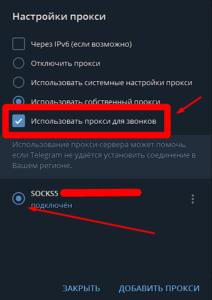
That's all. The setup is complete.
On phone: Android and iOS
Интерфейс «Телеграма» выглядит одинаково как на устройствах с операционной системой Android, так и на устройствах с iOS (iPhone). Процедура настройки proxy for Telegram on Android is performed as follows. Let's look at this process step by step:
1. Open the application and go to Settings.
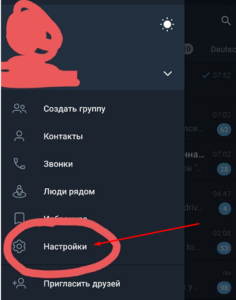
2. Select Data and Memory.
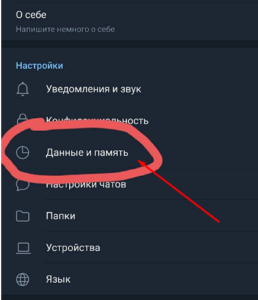
3. Scroll down the page and click on “Proxy Settings”.
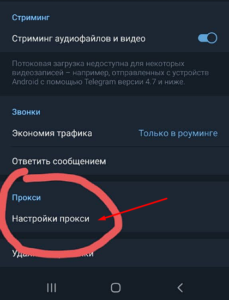
4. Click "Add proxy".
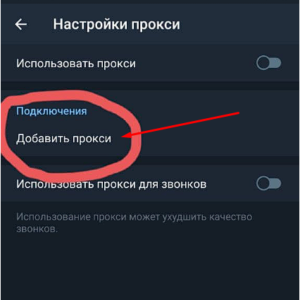
5. Select proxy type: Socks 5 or MTProto.
6. Enter the required data, such as server address, port, login and password.
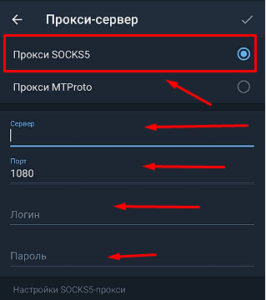
7. Check the box in the upper right corner. If the IP address is working, you will see a green "Available" message.
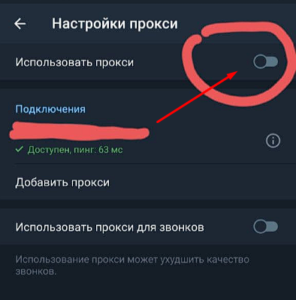
8. Click "Use proxy". A blue “Connected” message will appear.
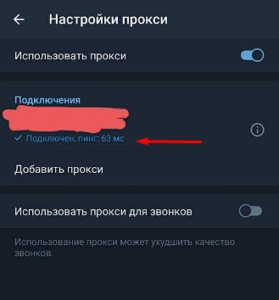
9. To add a new proxy, click “Add proxy”.
Ready. Now you know how to connect a proxy in Telegram on Android.
How to use a proxy on iPhone
To connect proxy for Telegram iOS to iPhone or iPad, follow the steps in the manual:
- Open Telegram on your device.
- Go to the “Settings” section.
- Next, go to the “Data and Memory” subsection.
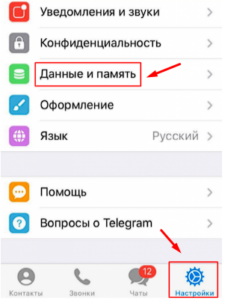
- Now scroll down to “Connection Type” and click on the “Proxy” menu item.
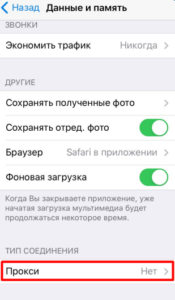
5. Activate the toggle switch next to the “Use proxy” item.
6. Select a proxy protocol to log into Telegram.
7. Enter the IP address and port.
8. Enter your username and password.
9. Click "Done" to save your settings.
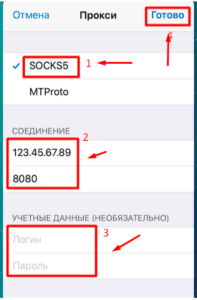
Follow these steps and you will be able to install a proxy in Telegram on iPhone.
Step-by-step proxy disabling in Telegram on Android
If the user disables proxy server for Telegram then he will lose his anonymity. Use this only on special occasions and do not forget to turn the proxy back on.
Here's how to disable proxy on Android:
- Go to Settings and find the “Data and Memory” item.
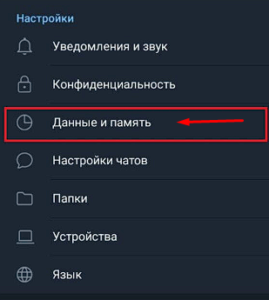
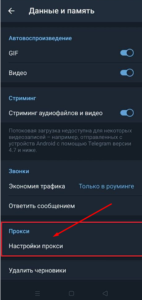
2. Scroll down the screen and tap on the “Proxy” item.
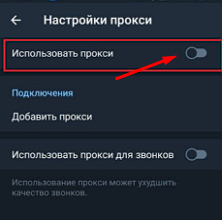
3. In the window that opens, you need to move the switch to the left side to disable the use of proxies.
Disabling proxy in Telegram for iOS (iPhone, iPad)
To disable proxy on Apple devices in the application, follow these steps:
- Go to proxy settings for Telegram and find the “Data and Memory” item.
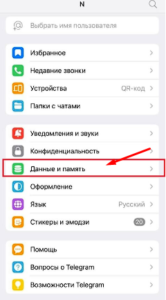
2. In this section, find the “Connection type” item and click on it. In the window that opens, select “Proxy”.
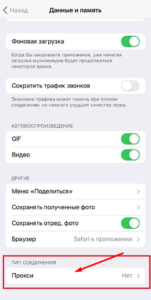
3. Move the “Use proxy” slider to the left.
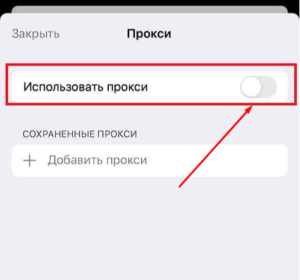
After these procedures, the Telegram proxy on your smartphone will stop working until you enable this feature again.
We figured out how add proxy to "Telegram» on different devices and provide free access to the famous messenger. Now you can enable and disable proxy in Telegram. All that remains is to acquire high-quality proxies.
Where to buy a proxy for Telegram
In order to figure out where to buy a proxy for Telegram, we have created a rating of the best suppliers. The best proxies for Telegram private and clean, yet affordable. All you need to do is read the reviews and choose one of the providers. You can't go wrong - we tested all the companies and gave ratings for their service. There are no unscrupulous suppliers in the rating.
We advise you to choose private server proxies from the Russian Federation or other countries. They are affordable and great for working with Telegram.