Hello readers. Today we will figure out how to set up a proxy on the iPhone and iPad, and also find out what intermediate servers are for on the phone.
The IP connection mechanism on the iPhone and iPad is the same, so it makes no sense to show two instructions one to one. For example, we used the iPhone 6S. If you have a different version, then some steps may differ, but the essence is the same.
Instruction
The algorithm for setting up a proxy on iOS is as follows:
- Open "Settings" and select "Wi-Fi".
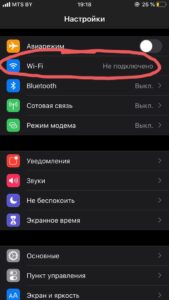
- Tap on the settings icon next to our network.
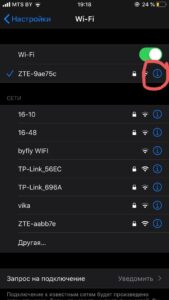
- Scroll down and click "Proxy settings".
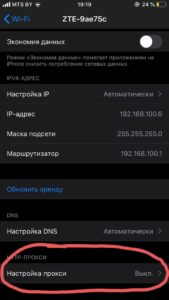
- Select "Manual".

- Enter the server and port IP. Then, in the “Authentication” item, rewind the slider to the right and enter the login and password of the IP address.
Everything, the setup of the intermediate server has been completed.
Why do you need a proxy on your phone
Proxies on a smartphone help bypass blocking sites. The fact is that some web resources are blocked in certain regions. If you want to visit such resources, then the proxy will be enough to fool the system.
How it works. The intermediate server replaces the real IP address with the real one. This is how blocking works. For example, a resident of Russia decided to read a news site that is only available in Saudi Arabia. The user connects the Saudi proxy and calmly opens the web resource.
Where to buy a proxy for iPhone
On our website, we have compiled a rating of proxy sellers, where we have collected the best providers. Choose the one you like best. To learn more about the seller, read his review. To do this, click on the appropriate button next to a brief description of the service.
Next to the description, we left a link to the supplier's website. To open the site, click the "Go" button.